
The best AI game maker for a beginner is the one that gets you from an idea to a game you can play, change and send to a friend — on the first evening, without learning an engine. By that test, an AI-first maker that builds the whole game from a sentence (EvonX, Rosebud, Google Playground) beats an engine with an AI assistant (GDevelop, Roblox Studio), even when the engine is the more powerful tool.
This guide ranks ten tools for that one reader: someone with a game idea and no coding background. Every tool is judged on the same five questions, and every section says who the tool is not for. We make one of the tools on the list — EvonX — so we have kept its section to the same checklist as the rest and said plainly where another tool is the better pick.
The short answer
| Rank | Tool | Best for a beginner who wants… | Free start | Code needed |
|---|---|---|---|---|
| 1 | EvonX | A polished casual or 3D game on a phone, from one sentence | Yes, no card | No |
| 2 | Rosebud AI | An open-ended browser experiment, 2D or 3D | Yes, weekly credits | No |
| 3 | Google Playground | Quick prompt-to-game play inside Google's ecosystem | Tied to a Google AI plan (US) | No |
| 4 | Astrocade | Short games for a built-in social feed | Yes | No |
| 5 | PlayDrop | Simple multiplayer browser games and tips | Yes, daily credits | No |
| 6 | Manus | A general AI agent that can also build a game | Yes, daily credits | No |
| 7 | GDevelop | A real engine with an AI helper, and store exports later | Yes | Visual events |
| 8 | Roblox Studio + Assistant | A game that lives on Roblox | Yes | Some Luau |
| 9 | Replit | A coding project where an agent writes the game | Limited | Yes, to go further |
| 10 | A general chatbot | A single-file toy to learn from | Yes | Yes, to run it |
If you want to skip the reading: describe your game on the AI game maker and play it in a few minutes. If you are unsure what kind of AI tool you even need, start with game maker AI: assistants vs AI-first makers.
How we judged them: five beginner questions
Most "best AI game maker" lists compare feature tables. A beginner does not need features; they need to not get stuck. So each tool was scored on five questions, in this order:
- Time to playable. How long from a sentence to something with a goal and a way to lose — not a title screen, not a code file?
- Changes without code. Can you say "make level 3 harder" and get the same game back, changed — or does it start over, or hand you code?
- Free start. Can you get to a first playable game without a credit card?
- Sharing. Can a friend play it from a link on their phone, without installing anything?
- Setup. Is there anything to download, configure or learn before the first build?
A tool that fails question 1 or 2 drops down the list no matter how capable it is, because that is where beginners quit.
1. EvonX — best overall for beginners
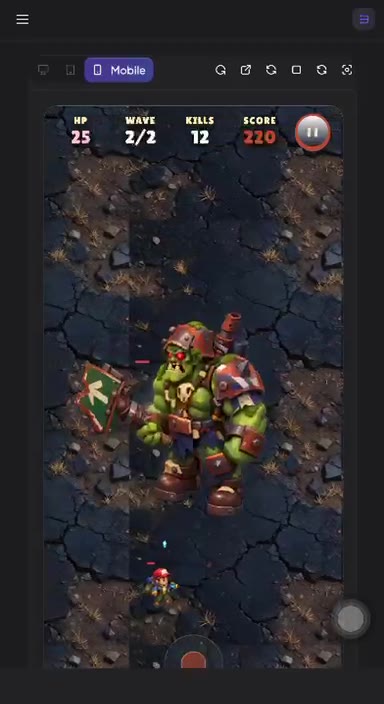
EvonX is an AI game maker that builds the whole game from a description: the rules, levels that get harder, menus and win and lose screens, art in one style, sound and — on the Pro plan — animated 3D characters. It runs in the browser and opens the game in a phone-sized preview while it builds. You change it by chatting.
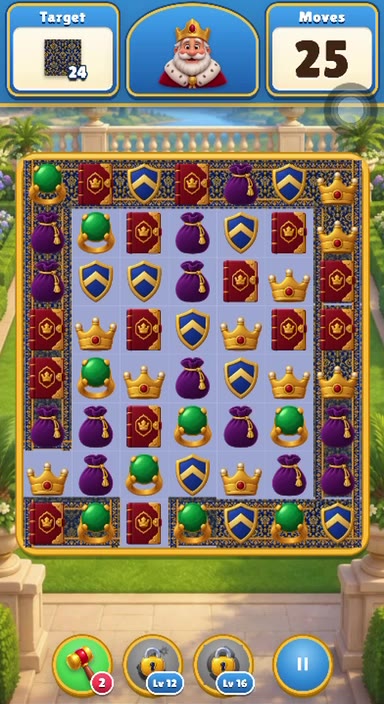
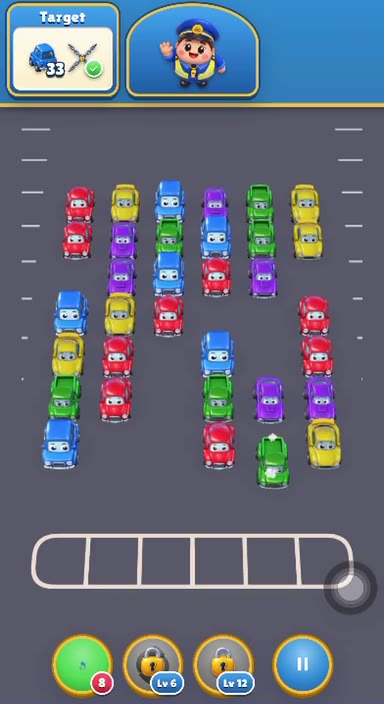
Why it ranks first for beginners. Every game starts from one of 31 genre templates — match-3, parking jam, block puzzle, survivor shooter, tower defense, idle tycoon and more — so the first build already plays like a real game instead of a prototype. After every change, EvonX builds the game, runs automated play-tests and checks a screenshot against what you asked for before you see it. For a beginner, that means far fewer broken builds to debug.
- Time to playable: minutes, from one sentence. See make me a game for prompts that work.
- Changes without code: yes, in chat, on the same project.
- Free start: building, editing and playing in the preview are free on the Starter plan with no credit card. You can publish a shareable link on Starter with the EvonX badge. Details on AI game maker free.
- Sharing: a link that opens in mobile and desktop browsers. Online rooms of up to 6 players by quick play, room code or invite link.
- Setup: none.
Beyond the first game. You can open your own shop and sell in-game items or take tips; EvonX handles the payments and pays you 80% of each sale. There is also a game title generator if you are stuck on a name.
Not for you if: you want a console game, a huge open world or an app-store package. EvonX makes web games; it does not package for the App Store or Google Play.
2. Rosebud AI — best for open-ended experiments
Rosebud turns a prompt into a browser game and lets you keep editing it in chat, with 2D, 3D and voxel options and a large remix library. It is a good fit if your idea does not match a known genre and you are happy to iterate on something rougher.
- Time to playable: minutes.
- Changes without code: yes, though you can also edit the JavaScript directly.
- Free start: a free plan with credits that refill weekly in eligible regions. Heavier editing uses credits fast, so expect to hit the limit on a busy evening.
- Sharing: web links.
- Setup: none.
Not for you if: you want a phone-first casual game that feels finished on the first build, or you need commercial rights and code download on a free plan — those sit on higher tiers. We compare the two in detail on our Rosebud AI alternative page.
3. Google Playground — best for quick play inside Google's ecosystem
Google Playground is an experimental Google Labs platform, launched on 7 October 2026, for creating and sharing games from text prompts. You describe a game, test it in the browser and ask for changes to rules, physics and characters.
- Time to playable: minutes.
- Changes without code: yes.
- Free start: creation is tied to a Google AI subscription tier, and at launch it was available to users in the U.S. aged 18 or older.
- Sharing: private, link or the Explore gallery.
- Setup: a Google account in an eligible country.
Not for you if: you are outside the U.S., or you want genre templates and 3D characters today; high-fidelity 3D was announced through a separate tool still in testing. See Google Playground alternative.
4. Astrocade — best for short games in a social feed
Astrocade pairs an AI game maker with a swipeable feed of short games, so a beginner gets an audience immediately. It suits tiny, snackable ideas more than a game with a level curve.
- Time to playable: fast.
- Changes without code: yes.
- Free start: yes.
- Sharing: inside its feed and by link.
- Setup: none.
Not for you if: you want to own and grow a game outside one platform's feed, or need a long level progression.
5. PlayDrop — best for simple multiplayer experiments
PlayDrop is a browser studio for 2D and 3D games with chat editing, solo or multiplayer, and creator tips. Its credit system has several layers, which can be confusing on day one.
- Time to playable: minutes.
- Changes without code: yes.
- Free start: a basic free account with daily credits and a game limit.
- Sharing: web links.
- Setup: a free account.
Not for you if: you want predictable costs while you learn, or polished casual genres out of the box.
6. Manus — best if you already use a general AI agent
Manus is a general-purpose AI agent that added a game development environment in 2026, with templates and publishing to a link. If you already use it for other work, building a game in the same place is convenient.
- Time to playable: minutes to longer, depending on the task.
- Changes without code: yes.
- Free start: daily free credits; builds consume them.
- Sharing: link.
- Setup: none.
Not for you if: you want a dedicated game maker whose every feature is about games; online multiplayer, for example, depends on extra paid compute.
7. GDevelop — best engine for beginners who want to grow
GDevelop is a free, open-source no-code engine with visual "events" instead of code, plus an AI assistant. It is the best step up if you want to understand how games are built and later export to desktop and mobile stores.
- Time to playable: hours for a first game, longer to learn the event system.
- Changes without code: yes, but you make them in the editor; the AI helps rather than builds.
- Free start: yes, with a small monthly AI allowance and limited one-click exports.
- Sharing: web publishing; store exports on paid tiers.
- Setup: learning the editor.
Not for you if: you want the game built for you tonight. Read GDevelop alternative for the trade-off.
8. Roblox Studio with Assistant — best if your game belongs on Roblox
Roblox Studio is free, and its Assistant can generate objects, scripts and plans. The audience is enormous, and if your friends play Roblox, this is where your game should live.
- Time to playable: hours to days; you still assemble the game in Studio.
- Changes without code: partly. Generated Luau scripts often need fixing.
- Free start: yes.
- Sharing: inside Roblox only.
- Setup: a desktop app and a real learning curve.
Not for you if: you want a game that works outside Roblox, or no code at all.
9. Replit — best if you want to learn to code along the way
Replit's agent can build a game as a full code project in the browser. That is powerful for someone who wants to read and edit code, and overwhelming for someone who does not.
- Time to playable: varies; the agent builds, you debug.
- Changes without code: possible, but the workspace is built for developers.
- Free start: limited agent use before paid plans.
- Sharing: deployed links.
- Setup: comfort with a code editor.
Not for you if: you never want to see code.
10. A general chatbot — best for learning, worst for finishing
Ask a chatbot to "make a game" and you get a page of code. If you save and run it, you may get a small single-file game — a good way to learn what code does, and a poor way to finish a game, because every change means copying, pasting and fixing by hand.
Not for you if: you want a game a friend can play tomorrow.
Which one should you pick?
- You want a finished-feeling game on a phone, from one sentence: EvonX.
- You want to try a strange idea that fits no genre: Rosebud.
- You want to learn how games are built and export to stores later: GDevelop.
- Your friends are on Roblox: Roblox Studio.
- You only want to test whether an idea is fun: prototype it first with a game prototype maker.
- You are not sure what kind of AI tool you need: read game maker AI first.
Before you commit: who owns your game?
Beginners rarely ask this until it matters. Three questions settle it:
- Can you see the code? EvonX generates the code for you and you own it; engines and code tools show it by default; some AI makers keep it on higher plans.
- Can you take the game elsewhere? Feed-based platforms and Roblox keep your game inside them. Web-first makers give you a link anyone can open.
- Can you earn from it? Check whether commercial rights are on the free plan. On EvonX you can sell in-game items and take tips from your own shop and keep 80% of each sale.
Six beginner mistakes, and what to do instead
| Mistake | Do this instead |
|---|---|
| Describing a dream game: open world, crafting, story, multiplayer | Describe one action: "park cars", "swap gems", "survive waves". Grow from there. |
| Writing a page-long first prompt | One sentence first. Add one change per message so you can see what each one did. |
| Judging the first build only by its looks | Play it. Lose on purpose. Fun comes from rules and difficulty, not the first art pass. |
| Picking the most powerful tool | Pick the one you will finish a game in. An engine you abandon beats nothing. |
| Never sharing until it is "done" | Send a link after the first evening. Watch where friends quit. |
| Ignoring the free plan's limits | Read what is free before you start, so a limit does not stop you mid-idea. |
FAQ
What is the best AI game maker for beginners?
For most beginners, an AI-first maker that builds the whole game from a sentence. EvonX ranks first here because its genre templates make the first build feel like a real game, every change is play-tested, and it is free to start with no credit card.
Is there a completely free AI game maker?
Several have free plans with limits. On EvonX, building, editing, playing and publishing a link with the EvonX badge are free on Starter. See AI game maker free for exactly what is included.
Can AI make a whole game from one prompt?
Yes, for casual and mid-core games. On EvonX one sentence produces a playable game with levels, screens and art. Large open-world games are still beyond any AI game maker.
Do I need to know how to code?
Not with an AI-first maker. Engines with assistants (GDevelop, Roblox Studio) and code tools (Replit, chatbots) still expect you to edit events or code.
What kinds of games can a beginner make with AI?
Puzzle games, match-3, parking and bus jams, survivor shooters, tower defense, idle and tycoon games, word games and simple 3D games are all realistic in an evening. Browse AI games made by other beginners for ideas.
Can I make money from a game I made with AI?
On EvonX, yes: open a shop for in-game items or take tips, and EvonX pays you 80% of each sale. On other tools, check whether commercial rights are included in your plan.
Can ChatGPT make a game?
It can write the code for a small game, but you have to run, test and fix it yourself. An AI game maker does those steps for you and shows you the playable result.
Ready to try? Create a game from one sentence, or open the AI game creator and describe the game you have been thinking about.