Painted paladin, attack then death
4 attack frames with a trail of light, then 4 death frames that stop on the last one. The feet stay on the ground line while the body falls.
Describe a 2D character, or upload one you drew, and EvonX animates it as a sprite sheet: idle, walk, run, attack, hit and death. Frames come out cut, standing on one ground line and timed, ready for your game.
How it is made
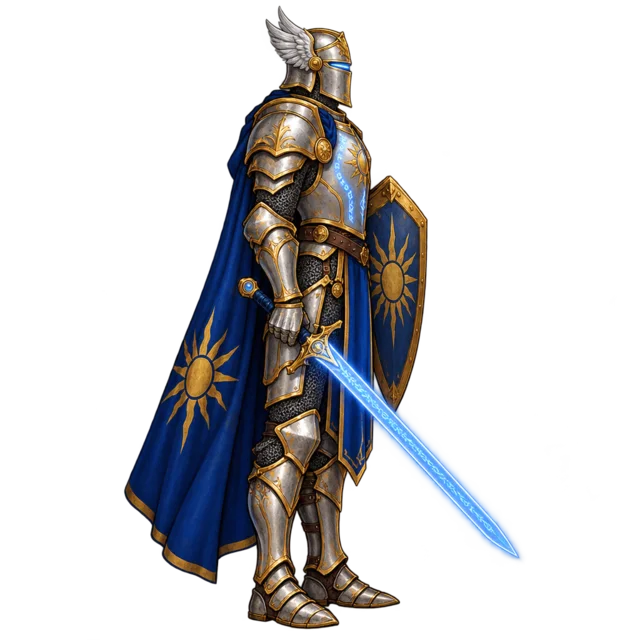
Write "a paladin in silver and gold plate, a winged helm, a glowing sword" and pick one of three looks, or upload your own drawing. Every clip is drawn from that one picture.
The walk is one picture, eight poses in two rows. Drawing a whole clip at once keeps the helm, the shield and the cape the same in every frame.
Each pose is cut out on its own and stood on a shared canvas: body in the middle, feet on one ground line. The glow and the background stay behind.
Every clip carries its own timing: seconds, loop and a motion type (walk, run, in place, planted). Death plays once, walk loops.
All six clips go into one PNG and the game's asset list, each clip with its frames and speed. Ask for one more clip later and only that clip is drawn.
For artists who don't animate
You drew the character. Animating it frame by frame is the slow part. Attach one picture in the chat and EvonX works as your 2D character animator: it keeps your design and draws the walk cycle, the run, the attack and the rest from it.
 The picture
Free tool, no sign-up
Our free sprite sheet maker turns a GIF or PNG frames into one sprite sheet and cuts a sheet back into frames and a GIF. It runs in your browser and nothing is uploaded.
What one character comes with
The paladin above, as the tool wrote it into the game's asset list. Loops keep going, one-shots stop on their last frame. The game reads the timing from the clip, so nothing is guessed from a clip's name.
| Clip | Plays | Frames in the sheet | Speed | Repeat | Motion |
|---|---|---|---|---|---|
| idle Standing guard, breathing | 1 to 4 · 4 frames | 2.5 / s · 1.6 s | loop | in place | |
| walk Walking right | 5 to 12 · 8 frames | 8.9 / s · 0.9 s | loop | walk | |
| run Running right | 13 to 20 · 8 frames | 16 / s · 0.5 s | loop | run | |
| attack Overhead swing | 21 to 24 · 4 frames | 10 / s · 0.4 s | once | planted | |
| hit Knocked back | 25 to 26 · 2 frames | 6.7 / s · 0.3 s | once | planted | |
| death Falls and stays down | 27 to 30 · 4 frames | 4 / s · 1 s | once | planted |
characters/dawn-paladin.png · 30 frames, 6 clips
Any style you describe
4 attack frames with a trail of light, then 4 death frames that stop on the last one. The feet stay on the ground line while the body falls.
8 frames at 8.9 a second, looping. Thick outlines, a big helmet and the star shield on the arm in every frame.
Before you start
Frames are drawn by an image model from your description or drawing. To fix one pixel, edit the PNG in your own editor.
A buckle or a feather can change slightly between frames. Ask to redraw the clip and play it in the preview before you keep it.
Walk and run cycles are built for characters that stand on two legs. Four-legged and flying creatures have not been tested with them yet.
Attach a picture that shows the character from head to feet, from the side. A portrait or a cropped pose can't be walked.
Questions
One picture that holds every frame of a 2D character's animations. A game shows one frame at a time, fast enough that the character seems to move. EvonX puts all of a character's clips in one sheet and writes down which frames belong to which clip.
Yes. Attach a picture of your character, whole body and side-on, and EvonX keeps your design and draws each clip from it. If you already drew some frames, attach them too and only the missing clips are drawn.
EvonX draws a walk and a run with 8 frames each, enough for both feet to pass twice. Idle uses 4, attack 4, hit 2 and death 4. You can ask for more frames on any clip.
The sheet is a PNG file in your game's project, which you own. Unity, Godot and other engines that play frame animation can slice it by its frames.
You can build a character and play it in the preview on the free Starter plan. Drawing frames uses credits, and each frame counts as one picture.
Yes. Ask for "a victory clip" and only that clip is drawn, from the same look, into the same character folder. The clips you already have are not redrawn.
Describe the character, or attach your drawing. Watch it walk.
Make a sprite sheet, free