
Most Shopify merchants live with a strange gap. The theme editor handles colors, fonts, and section settings well — but the moment a change needs code, everything stops. A sticky add-to-cart bar, a custom section, a mobile layout fix: suddenly you are choosing between learning Liquid, installing yet another app, or emailing an agency and waiting for the quote.
This guide walks through a third option: describing the change in plain language and letting an AI agent edit the Shopify theme code for you — with the two safety properties that make code-level changes acceptable on a store that earns money. Nothing renders to shoppers until you publish, and the settings you saved in the theme editor are never overwritten.
Why editing a live theme by hand goes wrong
Shopify themes are code: Liquid templates, sections, JSON configuration, CSS, and JavaScript. The classic ways merchants change that code all share a weakness.
Editing directly in the code editor of the live theme means shoppers see every intermediate state — including the broken ones. Duplicating the theme, editing the copy, and swapping it later is safer, but the duplicate silently drifts: every product added to a section, every banner text changed in the customizer while you were editing lands on the old copy or the new one, not both. And handing the whole problem to an agency reintroduces the queue you were trying to escape, at retainer prices.
The common failure in all three is that the process is manual, so the safety depends on discipline. The fix is a workflow where the safe path is the only path.
The safe workflow, step by step
The workflow Evonx uses has four stages, and each one exists to remove a specific risk.
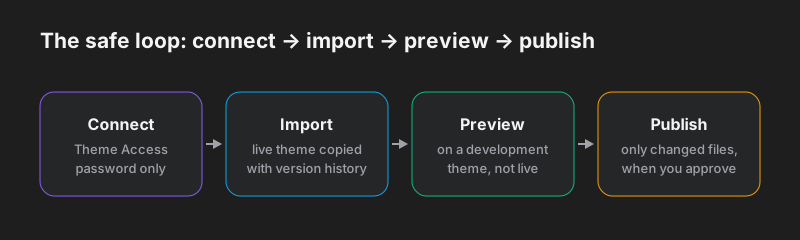
1. Connect with a Theme Access password — not admin access
Shopify offers a free app called Theme Access built for exactly this situation. It generates a password scoped to themes only. The tool you connect never sees orders, customers, or store settings, and you can revoke the password at any time from your Shopify admin. If a service asks for full admin credentials or a collaborator seat just to edit your theme, that is a scope problem worth questioning.
2. Import the theme with version history
The live theme is copied, file by file, into a workspace backed by version control. This matters more than it sounds: from this point on, every AI-made change is a diff — a readable list of exactly which lines changed in which files. If a change turns out to be wrong next week, the history says precisely what it was.
3. Preview on a development theme
This is the heart of the safety story. Shopify supports development themes — temporary, unpublished themes that render your real products, collections, and settings without being visible to shoppers. Each editing session uploads the workspace to a development theme, and you browse the result like a customer would. Iterate as many times as you like; your live theme is byte-for-byte identical to how you left it.
4. Publish only what changed, when you approve
Publishing is an explicit, separate act. The workspace is diffed against the last published state, and only the changed files are uploaded to the live theme. A ten-line CSS fix uploads a stylesheet, not a whole theme — faster, and far less surface for something to go wrong.
The part everyone gets wrong: customizer settings
Here is the classic agency deployment story. The merchant spends weeks arranging homepage sections, banner texts, and product page settings in the theme customizer. The developer finishes their work on a copy of the theme made a month ago and deploys it. Every one of those settings snaps back a month.
The cause is structural: Shopify stores customizer state inside the theme's files — mainly config/settings_data.json and the JSON templates. Deploy old copies of those files and you deploy old settings.
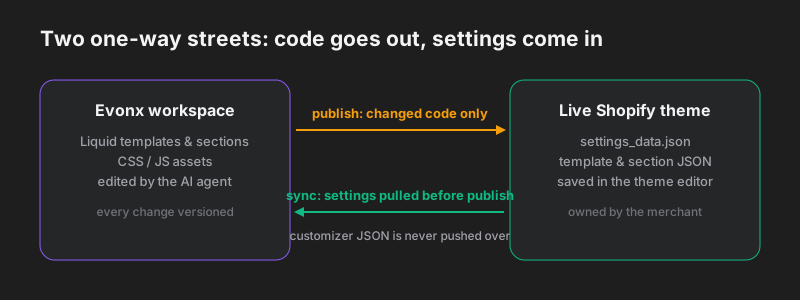
The safe workflow treats those files as one-way traffic in the opposite direction from code. Before every publish, the current customizer JSON is pulled from the store into the workspace, and the publish step excludes those files from the upload entirely. Your team can keep merchandising in the theme editor while code changes are in progress — the two workstreams stop being able to destroy each other's work.
What this looks like in practice
With the safety rails in place, the changes that used to wait in a ticket queue become same-day work. A few examples of requests that translate directly into theme code edits:
- "Add a sticky add-to-cart bar on product pages, visible after the buy box scrolls away."
- "Build an announcement banner section with a countdown, and let me set the text in the customizer."
- "Tighten the mobile spacing on collection pages — the cards feel cramped."
- "Move the reviews section above the fold on the product template."
Each one follows the same loop: describe it, look at it on the development theme with your real catalog, adjust, publish. If you already work with a developer, nothing is displaced — the workspace history shows them every change as a normal code diff, and the same settings protection applies to their manual pushes through Shopify's CLI, enforced by a .shopifyignore file in the repository.
A worked example: product page templates
Product page templates are the most requested theme edit right now, and they show how the pieces fit together. In current Shopify themes a product template is a JSON file that composes sections — and sections are where the code lives. Each section is a Liquid file whose {% schema %} block declares the settings that appear in the theme customizer.
That split maps cleanly onto the safe workflow. When you ask for something like "a product page variant for bundles, with a contents list under the buy box," the AI edits the code side: it writes the new section's Liquid and its {% schema %}, so the section shows up in your theme customizer with its settings editable — text, toggles, blocks — by anyone on your team. Composing templates and assigning them to products stays where it belongs, in your Shopify admin, because template JSON is merchant-owned configuration: it is exactly the kind of file the publish step syncs from your store and never overwrites.
The result is a clean division of labor. The AI writes and edits Shopify theme code — sections, snippets, styling; your team keeps arranging and assigning templates in the customizer; and neither side can clobber the other's work.
When this approach fits — and when it doesn't
Chat-driven theme editing shines for the long tail of store-specific changes: sections, layout, styling, small features, ongoing polish. It does not replace an app for problems that genuinely need server-side logic (subscriptions, complex bundles), and a full ground-up theme design is still a design project even when AI writes the code.
For everything in between — which for most stores is nearly everything — the combination of development-theme previews, protected customizer settings, and diff-based publishing removes the reason theme changes used to be scary.
If you want to try the workflow on your own store, the edit your Shopify theme page covers how the connection works and what to expect in the first session. And if your web presence extends beyond Shopify, the same describe-preview-publish loop powers website maintenance for regular sites too.