
A CMMS — computerized maintenance management system — is software that keeps track of everything your organization maintains: the equipment, the work orders against that equipment, the preventive schedules that stop it from breaking, the spare parts consumed along the way, and the numbers that tell you whether maintenance is getting better or worse. If your operation has machines, vehicles, buildings, or facilities that break, a CMMS is the difference between maintenance as a fire department and maintenance as a system.
The category has been around since the 1980s, but most maintenance in small and mid-sized operations still runs on the same three tools: a spreadsheet, a whiteboard, and one person's memory. That is not because teams don't know better — it is because the buying options have been awkward. This guide covers what a CMMS actually consists of, what the market charges, and the third option that recently became realistic: building your own.
The five modules every CMMS is made of
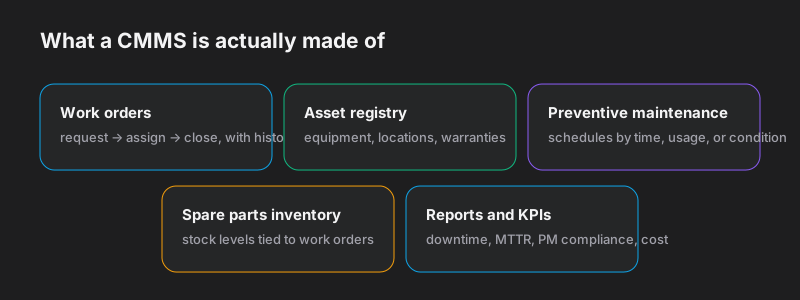
Work orders are the heart: a request comes in (or a schedule fires), it gets assigned, someone does the work, and the record survives — what was done, by whom, how long it took, what it cost. The work order history is the most valuable dataset in the building, because it tells you which assets consume your budget.
The asset registry is the catalog of everything maintainable: machines, vehicles, HVAC units, locations, warranties, manuals, and the hierarchy between them (site → line → machine → component). Every work order and every schedule hangs off an asset.
Preventive maintenance (PM) is why the system pays for itself. Schedules fire by calendar (quarterly inspection), by usage (every 250 engine hours), or by condition (vibration above threshold), and generate work orders before the breakdown instead of after. The standard claim in the industry is that planned work costs a fraction of reactive work — the exact multiple is debated, the direction never is.
Spare parts inventory ties stock to work: which parts each job consumed, what remains on the shelf, and what to reorder before a $40 bearing being out of stock idles a $400,000 machine.
Reports and KPIs turn the history into decisions: downtime by asset, mean time to repair, PM compliance, maintenance cost per asset. This is the module that justifies the system to whoever signs the budget.
Who actually needs one
The honest threshold is not company size but memory overflow: the moment no single person can hold the maintenance state of the operation in their head. In practice that arrives around a few dozen maintainable assets, or the first time a regulator, insurer, or customer audit asks for maintenance records you cannot produce. Manufacturers, fleet operators, facilities and property managers, hospitals, schools, and municipalities are the classic buyers — but so is any restaurant group with twenty kitchens' worth of equipment.
What CMMS software costs — and where it pinches
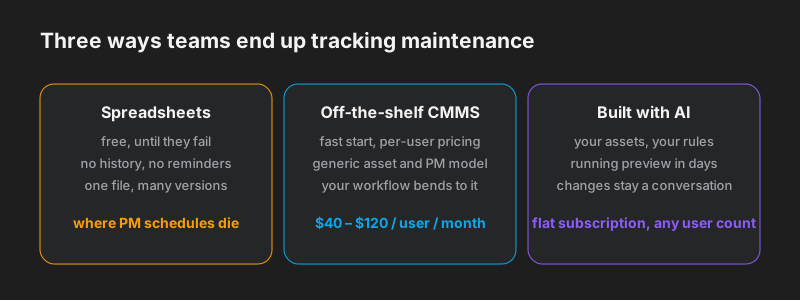
Mainstream cloud CMMS products price per user per month — commonly in the $40–120 range depending on tier, which means a 25-technician operation pays $12,000–36,000 a year before add-ons. Two structural complaints follow the category everywhere. First, per-user pricing punishes adoption: the system works best when every technician, operator, and requester is in it, which is exactly what the pricing discourages. Second, the generic model bends your operation: every plant numbers assets differently, every fleet has its own inspection sheets, every facilities team has approval quirks — and off-the-shelf tools handle the common 80% while your 20% lives in custom fields, workarounds, and the spreadsheet that was supposed to die.
The build option, after AI
Until recently, "build your own CMMS" was advice nobody gave, because custom software meant a six-figure project. That math changed. The five modules above are structurally standard — assets, orders, schedules, stock, reports — which makes them exactly the kind of application AI agents build well when you describe your operation. On Evonx's CMMS software builder, you describe your assets and how your maintenance actually flows — your inspection sheets, your approval rules, your asset numbering — and get a running system in minutes: your model, unlimited users, flat subscription pricing, and changes handled by describing them in chat rather than filing feature requests with a vendor.
The honest comparison: off-the-shelf wins when your process is standard and you want it running this afternoon. Building wins when your workflow is the asset — when the inspection sheets, compliance formats, and approval chains you have refined over years are precisely what generic tools flatten. And if what you have today is an aging on-premise CMMS from 2008 that nobody dares upgrade, that is a different starting point with the same destination — see our guide to legacy modernization.
Getting started, whichever way you go
Start with the asset list, not the software. Inventory what you maintain, pick the twenty assets that hurt most, and write down the PM schedule each one should have — that document makes every option cheaper, because it is the specification. Then run a four-week pilot on those twenty assets in whatever tool you chose. A CMMS that survives four honest weeks of real work orders will survive the rollout; one that needs a training program to log a work order will not. If the pilot you want is a system shaped like your operation rather than a template, describe it and see it running — the four weeks start today.