Product · Design Mockups
See the screens before they're built.
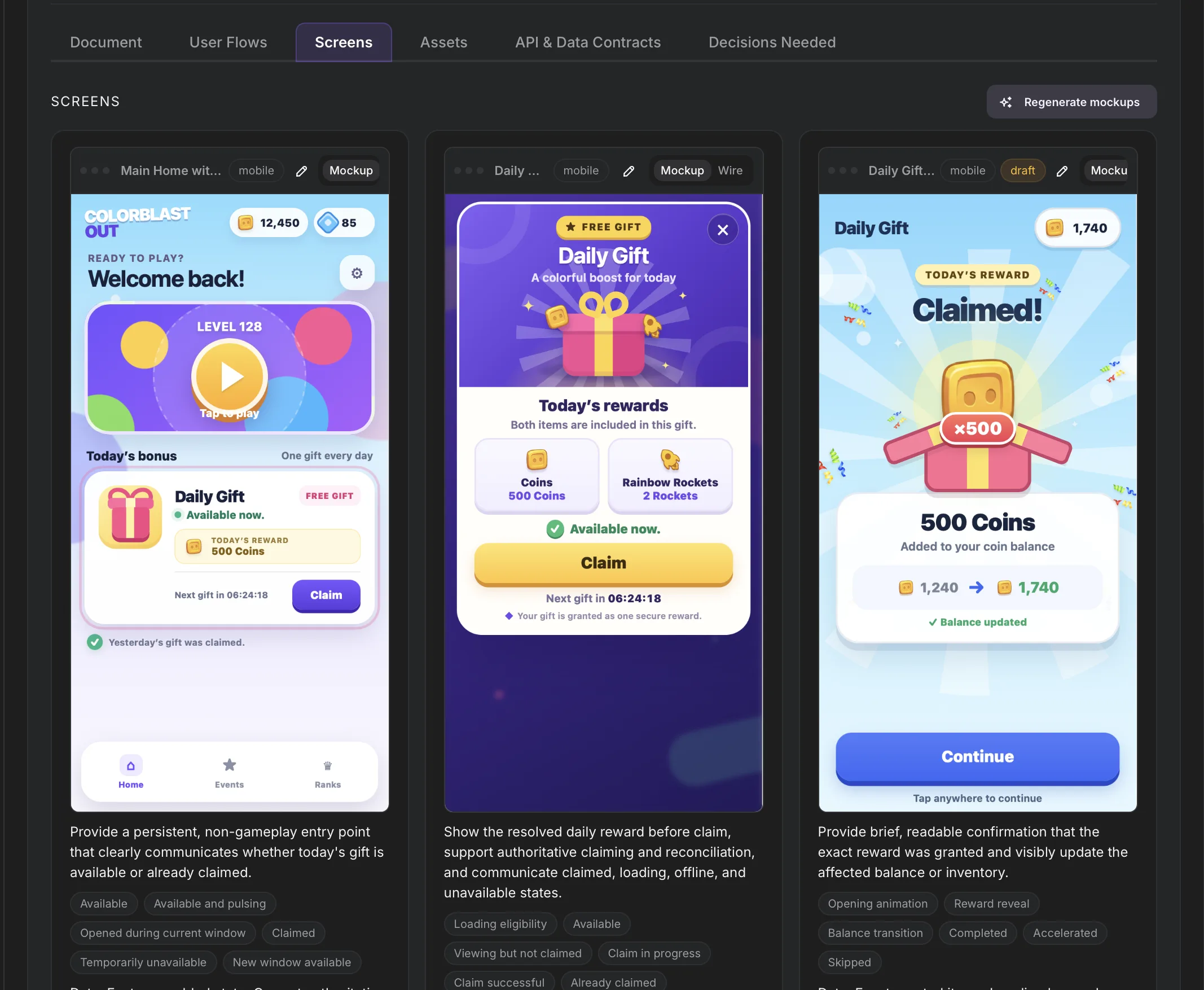
Describe a screen in chat and Evonx generates the mockup in place — using your application's real entities and fields, not lorem ipsum. Refine it in plain language, approve it, and the agent builds exactly that.
Generated in place
Mockups are created inside your project, on your design system — not in a separate design tool you then have to translate back into the product.
From wireframe to high fidelity
Start with a rough wireframe to settle the layout, then refine toward a high-fidelity mockup. Each step is cheap to change because nothing is code yet.
Your real data model on screen
Every mockup is grounded in your application's actual entities and fields. What you see in the mockup is what the working screen will show.
Iterate in plain language
“Move the totals to the top, make the status a badge” — say it in chat and the mockup updates. No design software to learn, nothing to redraw.
Approval that means something
Because mockups are derived from the same model the agent builds from, approving a mockup isn't a suggestion — it's the specification. The screen that ships matches the screen you approved, down to the fields on it.
Part of one pipeline
Mockups sit between user flows and working software: a flow decides which screens exist and how they connect, mockups decide what each screen looks like, and the agent turns approved mockups into tested, running code with a live preview.
Design your next screen in chat.
Start free. Describe a screen and watch the mockup appear — then approve it and watch it become software.